Object Storage in Distributed Systems

Object storage (Amazon S3, Google Cloud Storage, Cloudflare R2, MinIO) stores unstructured files — images, videos, backups, Parquet data lakes, static assets — as immutable objects inside a flat namespace called a bucket. Every object bundles three things together: a unique key (like uploads/2026/video.mp4), arbitrary metadata (Content-Type, custom tags), and the raw binary payload, all accessed over simple HTTP (PUT, GET, DELETE).

Unlike local disks or relational databases, object storage scales virtually without limit, costs pennies per gigabyte, and delivers extreme durability (typically 99.999999999% — “11 nines”) by automatically replicating and erasure-coding data across multiple availability zones.

The Production Upload & Delivery Pattern (Presigned URLs + CDN)

A common beginner mistake is streaming 500 MB user uploads through your application servers before forwarding them to S3. That ties up API worker threads, saturates server bandwidth, and doubles data transfer cost. Instead, production systems use Presigned URLs for writes and a CDN for reads:
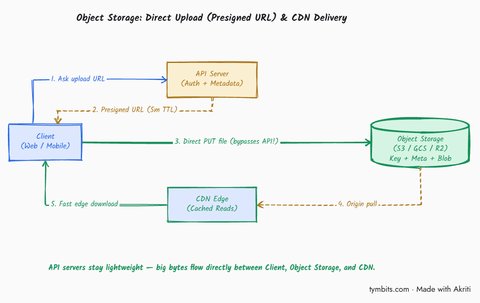
Object storage direct upload and delivery flow: Client asks API Server for an upload URL, API Server returns a short-lived Presigned URL, Client uploads the file directly via PUT to Object Storage bypassing the API server, and future reads are served from CDN Edge after an initial origin pull Object storage direct upload and delivery flow: Client asks API Server for an upload URL, API Server returns a short-lived Presigned URL, Client uploads the file directly via PUT to Object Storage bypassing the API server, and future reads are served from CDN Edge after an initial origin pull
Presigned URL upload + CDN read: API servers only sign requests and store metadata while big bytes flow directly to/from Object Storage · Made with Akriti
  1. Authenticate & authorize: The client calls your API server (POST /uploads/init) with file metadata (name, size, MIME type).
  2. Mint a presigned URL: After verifying permissions and quota, the API server generates a cryptographically signed URL valid for a few minutes (5m TTL) scoped to one exact object key and max content length.
  3. Direct upload: The client PUTs the binary bytes straight to S3/GCS/R2 — completely bypassing your API servers and load balancers.
  4. Edge-cached reads: Public or signed downloads are served through a CDN pulling from the bucket on first miss, cutting latency and egress fees dramatically.

Object Storage vs. Block Storage vs. File Storage

Dimension Object Storage (S3, GCS, R2) Block Storage (EBS, Persistent Disk) File Storage (NFS, EFS, SMB)
Structure Flat bucket + key + metadata + blob Fixed-size raw disk blocks Hierarchical folders & files (POSIX)
Access protocol HTTP REST API (GET / PUT) Mounted local OS block device Network filesystem mount
In-place edits No — objects are immutable (overwrite whole object) Yes — random byte/block writes Yes — partial file edits & locking
Latency Tens of milliseconds (high throughput) Sub-millisecond Low single-digit milliseconds
Best for Media, user uploads, backups, static sites, data lakes Databases (PostgreSQL, MySQL), OS boot volumes Shared legacy app files, multi-host POSIX mounts

Under the Hood: Durability, Consistency, and Scale

  • Erasure Coding vs. Full Replication: Storing 3 full copies (3× storage overhead) protects against 2 failures. Object stores often use Reed-Solomon erasure coding (e.g., splitting an object into 8 data chunks + 4 parity chunks across racks/zones), surviving up to 4 simultaneous failures at only 1.5× storage overhead.
  • Strong Read-After-Write Consistency: Modern object stores (including S3 since December 2020 and GCS) provide strong read-after-write consistency for PUTs and DELETEs — immediately after a successful upload, any subsequent GET or LIST sees the new object.
  • Multipart Uploads: For files larger than ~100 MB, split the file into 5–100 MB chunks uploaded in parallel. If chunk #17 fails on flaky mobile Wi-Fi, only chunk #17 retries instead of restarting the entire upload.
  • Storage Classes & Lifecycle Rules: Automatically transition older objects from Standard → Infrequent Access → Cold/Glacier archives after 30 or 90 days to slash storage bills by 70–90%.
  • Key Prefix Distribution: Notice that / in photos/2026/a.jpg is just a visual delimiter in a flat key string, not a real OS folder. Avoid putting hot sequential timestamps at the start of keys if a legacy store partitions by key prefix (see Partitioning Strategies).

FAQs

Why shouldn’t I store large images or PDFs as BLOBs in PostgreSQL? Relational databases store rows on expensive, low-latency block storage and replicate every byte through write-ahead logs (WAL), backups, and RAM buffer pools. Storing big blobs in SQL bloats database size, slows backups/failovers, and costs 10× more than object storage. Store the file in S3/R2 and store only its object key and metadata in your database.
Are presigned URLs secure? Yes, when scoped tightly. Sign the URL with a short expiration (1–10 minutes), lock it to a specific HTTP method (PUT), exact object key, Content-Type, and maximum file size (Content-Length-Range), and never expose long-lived IAM credentials to browsers or mobile apps.
How do I know when a client finishes a direct upload? Configure bucket event notifications (e.g., S3 → SQS / EventBridge / Lambda) so the object store emits an event into your message broker the moment the PUT completes. A background worker can then virus-scan, transcode thumbnails, and mark the upload READY in your database.
Can I edit 10 bytes in the middle of an object in S3? No — objects are immutable. To modify a file, you upload a new version of the entire object (or compose a new object from existing parts). If your workload needs frequent small random writes, use block storage or a database instead.