A message broker (or message queue) is dedicated middleware that accepts messages from producers, durably buffers them, and delivers them asynchronously to consumers. By placing a broker between services, you eliminate temporal coupling — producers keep responding quickly even when downstream workers are slow, scaling up, or temporarily offline.
(For the conceptual side of message payloads — Command, Event, and Document messages — see the Messaging section. This guide focuses on the broker infrastructure itself.)
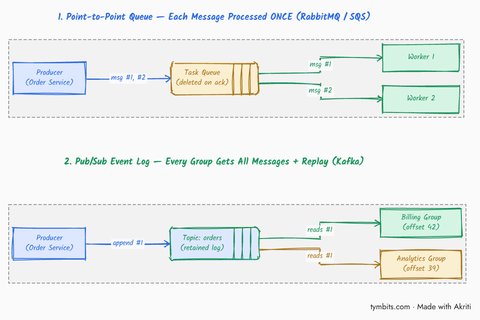
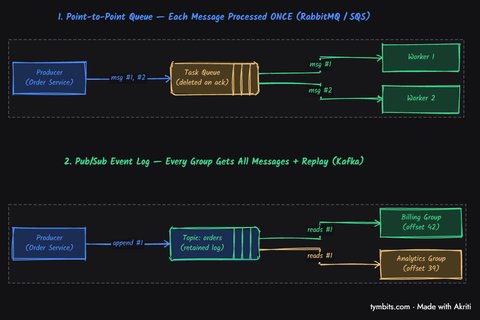
Most production message brokers fall into one of two models: a traditional task queue (messages are deleted once acknowledged) or a distributed append-only log (messages stay retained on disk and each consumer group tracks its own offset):
Point-to-Point Task Queue (competing consumers, delete-on-ack) vs. Pub/Sub Event Log (retained log, independent consumer group offsets) · Made with Akriti
Point-to-Point Queue (Competing Consumers): Multiple workers pull from the same queue, and each message is processed once by whichever worker claims it first. Once the worker sends an acknowledgment (ACK), the broker removes the message. Ideal for background jobs (thumbnail generation, sending emails, invoice PDFs).
Pub/Sub Partitioned Log (Event Streaming): Producers append events to an immutable, partitioned log (topic). Multiple independent consumer groups (e.g., Billing, Search Indexer, Analytics) each receive every event and track their own read position (offset). Because messages are retained for days or weeks, a new service or bug fix can replay historical events from offset 0.
Because networks drop packets and workers crash mid-task, brokers offer three delivery guarantees:
At-Most-Once: Message is marked done before processing finishes. Fast, never duplicates, but crashes lose messages (acceptable for non-critical metrics).
At-Least-Once (Standard Default): Broker redelivers any unacknowledged message after a visibility timeout. Zero data loss, but duplicates will happen when a worker finishes work and crashes right before sending ACK.
Effectively-Once (At-Least-Once + Idempotent Consumer): In practice, distributed systems achieve safe “exactly-once” outcomes by combining at-least-once delivery with an idempotent consumer that deduplicates using a unique messageId (stored in a database unique constraint or Redis cache).
Dead-Letter Queues (DLQs): If a malformed “poison pill” message crashes a worker 5 times in a row, retrying forever blocks healthy traffic. Configure a max-retry threshold that routes failing messages into a separate DLQ for inspection and replay.
Backpressure & Consumer Lag Monitoring: A queue absorbs traffic spikes (load leveling), but if producers permanently outpace consumers, lag grows until disk fills or SLAs break. Alert on consumer lag (or oldest-message age) and autoscale consumers up to the partition count.
Transactional Outbox: Writing to a database and publishing to a broker are two separate systems — if the process crashes in between, they drift out of sync. Use the Outbox pattern (covered in Temporal Coupling and Distributed Transactions) so both happen atomically.
When should I choose Kafka over RabbitMQ or SQS?
Choose Kafka when multiple downstream teams need the same event stream, when you need event replay (rebuilding a search index or onboarding a new analytics service), or when throughput exceeds hundreds of thousands of messages per second. Choose SQS or RabbitMQ for classic job queues where each task runs once and you want per-message retries, delays, or zero cluster management.Why does Kafka limit consumer parallelism to the number of partitions?
Within a single consumer group, Kafka assigns each partition to at most one consumer at a time so strict message ordering inside that partition is preserved. If a topic has 6 partitions, adding a 7th consumer in the same group leaves it idle — plan partition counts ahead of peak concurrency (see Partitioning Strategies).What is a visibility timeout in SQS?
When a worker pulls a message from SQS, the message isn’t deleted yet — it simply becomes invisible to other workers for a configurable window (e.g., 30 seconds). If the worker finishes and deletes it in time, it’s gone; if the worker crashes, the message reappears after 30 seconds so another worker retries it.Can a message queue replace a database?
No. Even though Kafka retains logs for days or indefinitely with log compaction, brokers are optimized for sequential append-and-scan streams, not arbitrary point lookups, secondary indexes, or relational joins. Use a broker to move events and trigger updates into purpose-built stores.