Title here
Summary here
The Domain Name System (DNS) is the internet’s globally distributed directory that translates human-readable domain names (like tymbits.com) into machine-routable IP addresses (like 104.21.x.x). Beyond simple name lookup, DNS is the very first routing layer in almost every large-scale architecture — steering users to the nearest CDN edge, distributing traffic across regional load balancers, and enabling multi-region failover.
When you type tymbits.com into a browser and the answer is not already cached locally, a recursive resolver (run by your ISP or a public provider like Cloudflare 1.1.1.1 or Google 8.8.8.8) walks the DNS hierarchy on your behalf:
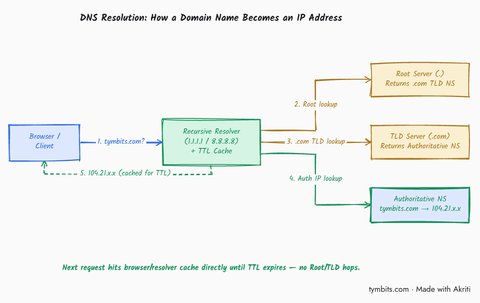
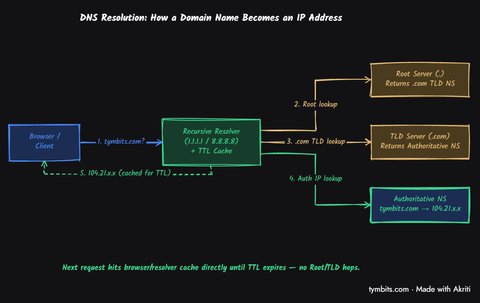
/etc/hosts). If a fresh entry exists, no network call happens.1.1.1.1, 8.8.8.8, or ISP resolver). If the resolver already cached tymbits.com for another user, it replies immediately in ~5 ms..): If uncached, the resolver asks one of the 13 logical Root clusters (backed by hundreds of Anycast servers worldwide). The root doesn’t know tymbits.com, so it replies with the nameservers responsible for .com..com): The resolver asks the .com Top-Level Domain server, which replies with the Authoritative Nameservers configured for tymbits.com (for example, Cloudflare DNS or AWS Route 53).104.21.x.x) along with a TTL (Time to Live) in seconds.| Record | Maps From → To | Typical Use Case |
|---|---|---|
A |
Hostname → IPv4 address | Pointing api.example.com to a load balancer IPv4 |
AAAA |
Hostname → IPv6 address | Dual-stack IPv6 support alongside A records |
CNAME |
Hostname → Another hostname | Aliasing www.example.com to a CDN or SaaS domain (not allowed at zone apex without CNAME flattening/ALIAS) |
NS |
Domain → Authoritative nameservers | Delegating a domain or subdomain to a DNS provider |
MX |
Domain → Mail server + priority | Routing inbound email (SMTP) |
TXT |
Domain → Arbitrary text | Domain ownership verification, SPF, DKIM, and DMARC email security |
SRV |
Service name → Host + port | Internal service discovery (Kubernetes CoreDNS, Consul) |
Modern managed DNS providers (Route 53, Cloudflare, NS1) don’t just return one static IP — they dynamically compute answers per query:
A records in rotating order to spread load across several entry points. Simple, but clients cache one IP for the full TTL and DNS itself doesn’t know per-server load.DNS scales to billions of queries per second because it relies heavily on multi-layer caching (browser → OS → router → recursive resolver). That same caching creates classic operational trade-offs:
3600s–86400s): Fewer authoritative lookups and lower DNS cost, but if an origin IP dies, users keep hitting the dead IP until cached entries expire.30s–60s): Faster failover and blue-green cutovers, but higher query volume and more frequent cold-lookup latency.AXFR), or when using encrypted DNS-over-HTTPS (DoH) / DNS-over-TLS (DoT).CNAME cannot be placed at a zone apex (like tymbits.com) because RFC rules forbid mixing CNAME with SOA/NS records. ALIAS / ANAME (or Cloudflare’s CNAME flattening) resolves the target hostname on the authoritative server and returns a plain A/AAAA record to clients, making apex-to-CDN routing work seamlessly.payment.default.svc.cluster.local to stable virtual ClusterIPs (or pod IPs via headless services) — forming the backbone of server-side service discovery.